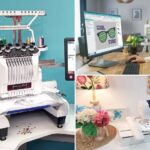
You see inspiration everywhere: a logo on a website, a child’s drawing on the fridge, a beautiful icon in an app. You imagine it stitched onto a bag, a quilt square, or a hat. Your Janome embroidery machine is ready, but there’s that familiar, frustrating wall: your machine needs a JEF file, and all you have is a picture. It feels like a limitation, but it doesn’t have to be. This barrier is a gateway. With the right knowledge, you can Convert Image to JEF File and turn any visual idea into a stitched reality. Let’s break down that wall and explore how to feed your Janome’s creativity with designs from the whole wide world.
Introduction: Your Janome is a Storyteller, Not Just a Stitcher
Think of your Janome embroidery machine as a brilliant narrator. It can tell incredible stories with thread, but it needs the story written in a language it understands—JEF format. The images on your computer, phone, or even sketched on paper are just story ideas. They’re the inspiration, the plot summary.
Converting an image to a JEF file is the process of writing the full script from that idea. It involves translating colors into thread sequences, shapes into stitch paths, and shades into texture. When you learn this skill, you stop being a consumer of pre-written stories (pre-made designs) and become the author. Your hoop becomes a stage for your own creations, and nothing you see is off-limits.
The First Chapter: Preparing Your Image for Success
Every great adaptation starts with a strong source material. You can’t turn a blurry, scribbled note into a masterpiece. Your image preparation is the most important step for a good conversion.
1. Choose the Right “Story” to Adapt:
Start simple. Your first projects should be images with:
- High Contrast: Clear separation between the subject and background.
- Bold Shapes: Simple graphics, icons, or silhouettes.
- Limited Colors: 3-5 distinct colors are easier to manage than a full rainbow.
Avoid highly detailed photographs for now. Think graphic novel, not oil painting.
2. Become the Editor: Clean Up Your Image
Use free, easy tools like Canva, Photopea, or Microsoft Paint.
- Remove the Background: This is the single biggest improvement you can make. Use a magic wand or “remove background” tool to isolate your subject on a plain white or transparent canvas. A busy background will confuse conversion software.
- Sharpen and Define: Increase the contrast and apply a slight sharpen filter. You want the edges of your design to be crisp and clear.
- Simplify Relentlessly: Zoom in. Are there tiny details, hairline strokes, or text smaller than 1/4 inch? For embroidery, these often need to be boldened or removed. This isn’t losing the design; it’s adapting it for a new, textured medium.
3. Know Your Canvas Size:
Decide how large (in inches or centimeters) you want the final embroidery to be. A complex design shrunk too small will lose all detail and become a muddy knot of thread.
Your Adaptation Toolkit: Choosing the Right Method
You have several paths to turn your edited image into a JEF file. The best one depends on your budget, time, and desire to learn.
Method 1: Use Janome’s Own Software (The Official Translator)
Janome offers software like Janome Digitizer or Janome Artistic Digitizer.
- How It Works: You import your image and use the “Auto-Digitize” or “Image Stitch” function. The software traces the shapes and creates stitch objects. You can then tweak settings and export directly to JEF.
- The Pro: It’s made for your machine, so compatibility is seamless.
- The Reality Check: The auto-result is a first draft. You’ll need to learn the software’s editing tools to clean up stitch types, add underlay, and adjust density for a quality finish.
Method 2: User-Friendly Third-Party Software (The Powerhouse with Training Wheels)
Software like Wilcom Hatch Embroidery is renowned for making professional tools accessible.
- How It Works: Hatch has an excellent step-by-step workflow and a powerful auto-digitize function that provides a much cleaner starting point than most. Its intuitive editing tools then make it easy to refine the design before saving as JEF.
- The Pro: It teaches you good digitizing habits and offers incredible power as your skills grow.
- The Con: It’s an investment, though often more affordable than high-end industrial software.
Method 3: Online Digitizing Services (The Professional Ghostwriter)
This is the best method for guaranteed quality on an important project.
- How It Works: Upload your cleaned-up image to a service like Digitized or TheEmbroidery. Specify “JEF” format and your size. For a fee ($15-$30), a human digitizer creates a custom, optimized JEF file for you within 24-48 hours.
- The Pro: You get a professional-grade file without learning software. Perfect for business logos or special gifts.
- The Con: Cost per design, and you give up some creative control.
Method 4: Free Online Auto-Converters (The Risky Shortcut)
Websites that promise “free JPG to JEF conversion” are tempting but dangerous.
- The Harsh Truth: They use a basic algorithm that creates terrible embroidery files. They often have no underlay (causing puckering), excessive stitches, and chaotic color changes. They can literally damage your machine with nonsensical commands.
- When to Maybe Consider: Only for a single-color, simple silhouette you plan to stitch on scrap fabric as a purely experimental test. Never for a valued project.
Writing the Script: The Key Steps in Digitizing
If you’re using software, understanding this core process will make you a better “author,” even if you start with auto-digitize.
- Import and Frame: Bring your image into the software as a template. Set your digital hoop to your target real-world size.
- Trace the Outline: Use the software’s tools to create clean paths around each color area. Manual tracing beats auto-trace for control.
- Assign “Dialogue” (Stitch Types):
- Satin Stitch: Use this for text, borders, and outlines. It creates a smooth, glossy rope-like effect.
- Fill Stitch: Use this for larger solid areas. The direction of the fill (the angle) adds visual interest and strength.
- Add the “Stage Directions” (Underlay): This is the secret to professional results. Underlay is a layer of loose stitching that goes down first to stabilize the fabric. Without it, your top stitches will pucker the fabric. Always add underlay to fill areas.
- Sequence the “Scenes”: Program the order in which colors stitch. Good sequencing minimizes thread trims and jumps, making the sewing process faster and smoother.
- Export the Final Script: Go to File > Save As and select JEF (Janome) as the format. Save to your Janome’s USB drive.
The Dress Rehearsal: The Non-Negotiable Test Stitch
You would never open a play on Broadway without a dress rehearsal. Never run a new JEF file on your final project without a test.
- Rehearse on Scrap: Hoop a piece of the exact fabric and stabilizer you’ll use for the final piece.
- Run the Show: Stitch the JEF file on the scrap.
- Give Critical Feedback: Watch the performance. Does the fabric pucker? (Need better stabilizer or underlay). Are there gaps between colors? (Need “pull compensation” in the digitizing). Does the design look clear?
- Rewrite and Rehearse: Go back to your software, make the adjustments, create a new JEF file, and test again. This cycle is how professionals ensure perfection.
Embracing the Art of Translation
Remember, embroidery is an interpretation, not a photocopy. A gradient in your image will become elegant bands of color in thread. Fine lines will gain pleasing thickness. This textural, stylized result is the beautiful, handmade quality that makes embroidered items special. Don’t fight it—celebrate it.
Conclusion: Your World, Stitched
Learning how to Convert Image to JEF File is the ultimate creative unlock for your Janome. It transforms your machine from an appliance that plays pre-recorded patterns into a true partner in creation. The “limitation” of file formats becomes a mere technical step in a much larger, more rewarding process: bringing your unique vision to life.
Start with a simple, bold image. Choose a method that fits your style—whether it’s learning the craft with software or collaborating with a digitizing service. Most importantly, embrace the essential test stitch as part of the creative journey. With this approach, nothing you see is off-limits. Every idea can find its way into your hoop, waiting to be told in the beautiful language of thread.